Trade-in widget for your website. 30 days free.
Buyback Builder's trade-in widget puts your buyback prices on the website you already have. You paste one line of code into a page on Wix, WordPress, Squarespace, Shopify or any site that accepts HTML. Customers pick their device, storage, lock status and condition, see your offer, and lock it by email. It is free for 30 days, then $29/month.
The widget and your own buyback page at yourshop.buybackpage.com are the same thing in two places. Same prices, same steps, same offers list in your dashboard.
The embed code
This is the whole thing. Your dashboard shows it with your shop name filled in:
<script src="https://buybackpage.com/embed.js" data-shop="yourshop"></script>To show one device only, for example on a page called "Sell your iPhone", add data-device:
<script src="https://buybackpage.com/embed.js" data-shop="yourshop" data-device="iphone"></script>The values are iphone, ipad, watch, samsung, macbook and other (your custom items, such as AirPods or game consoles).
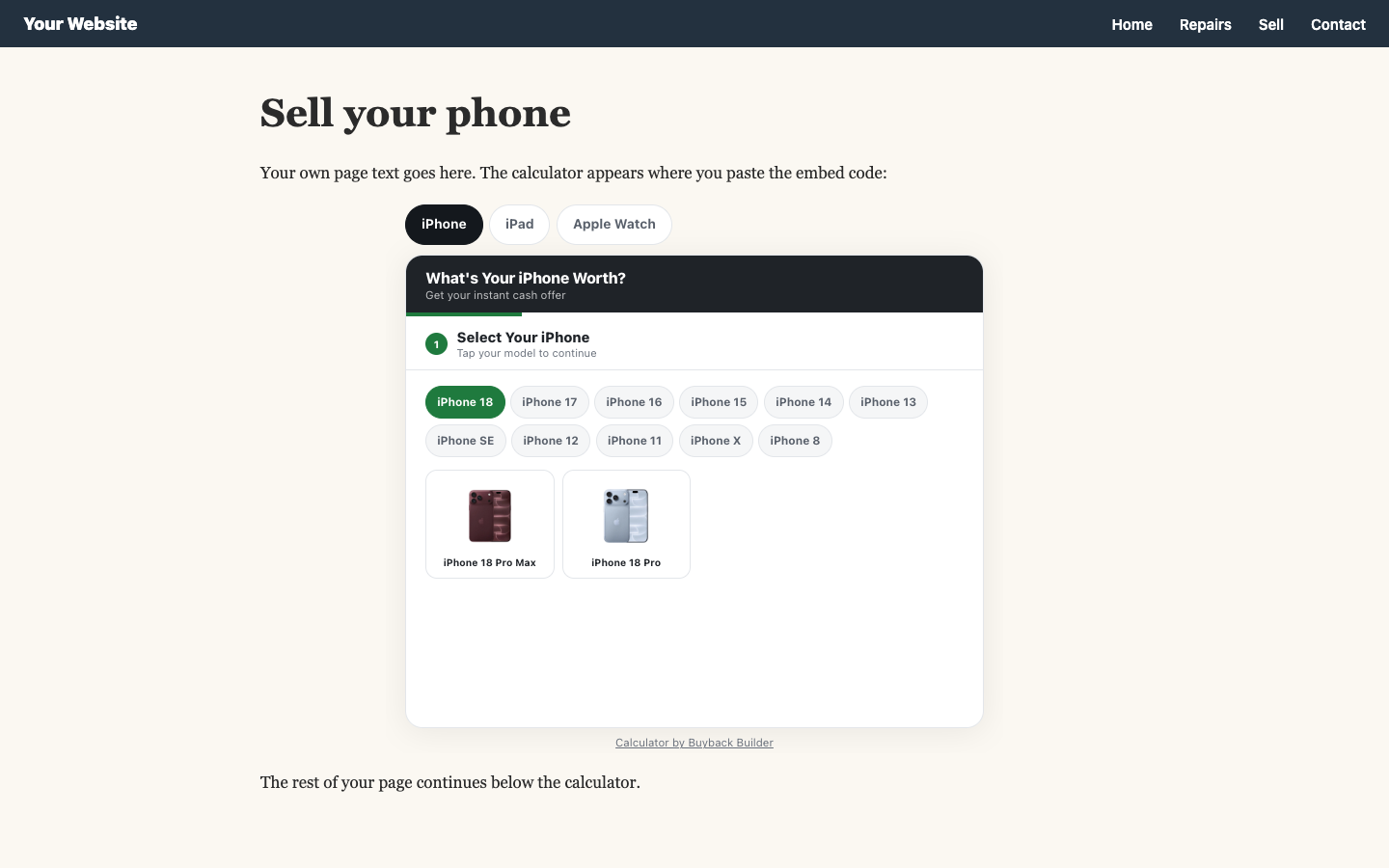
The script adds a frame right where you paste it. The frame grows and shrinks with each step, so there is no height to set and no scrollbar inside your page. Prices, locks and emails all run inside the frame, so there are no keys to paste and nothing else to configure on your site.
Set it up
- Sign up and claim your page. Pick your page name. That gives you
yourshop.buybackpage.comwith your name, address, phone, hours and logo. - Turn on the models you buy. Start from the device template: 40 iPhone, 31 iPad, 14 Apple Watch, 37 Samsung Galaxy, 24 Google Pixel, 25 MacBook, 6 Meta Glasses and 5 Nintendo Switch models, each with storage sizes and lock options filled in.
- Set your prices. Turn on Buyback Builder market prices (updated daily) and set your percentages, or type your own. The trade-in pricing guide shows how the percentages work. A model shows in the widget once it is on and has prices.
- Copy the embed code. It is on the Embed page of your dashboard, with a live preview.
- Paste it into your site. See the steps for your site builder below.
Most shops are done in about 5 minutes, most of it spent deciding which models to turn on.
Where to paste it
| Site builder | Where the code goes | Guide |
|---|---|---|
| Wix | Add Elements, Embed Code, Embed HTML | Wix guide |
| WordPress | A Custom HTML block | WordPress guide |
| Squarespace | A Code Block (plans that allow JavaScript) | Squarespace guide |
| Shopify | A Custom Liquid section on a page | Paste the code as is |
| Anything else | Any place that accepts HTML | Paste the code as is |
Two things catch people out. On Wix, the Embed HTML box has a fixed height, so drag it tall enough on desktop and on mobile. On WordPress.com free plans and some Squarespace plans, scripts do not run at all. In that case, link a button to your buyback page instead. Customers get the same steps and the same price lock.
What customers see
- Device type, if you buy more than one.
- Model, with a photo, grouped by series.
- Storage size.
- Lock status: unlocked or the carrier it is locked to.
- Condition, with your grades and the requirements for each one written out.
- Your offer. They can lock it with their name and email.
When they lock it, they get an email with an offer code, the device, the price, how long it holds (three days by default), your address and hours, and prep steps such as turning off Find My. You get a copy, and the offer shows up in your dashboard marked as coming from your website.
What it does not do
The widget is for customers who will walk into your shop. It does not print shipping labels for mail-in, pay sellers online, test devices or check IMEI status. You pay at your counter, the way you do now, and run your usual checks there.
Frequently asked questions
Is the trade-in widget free?
For 30 days, with no card. After that Buyback Builder is $29/month, cancel any time, and that includes the widget, your buyback page, price locks and the offers list.
Does the trade-in widget work on Shopify?
Yes. Add a Custom Liquid section to the page where it should appear and paste the embed code into it. It works on any site that lets you add HTML.
Will the widget slow down my website?
The embed is one small script that adds a frame. The widget itself loads inside that frame from buybackpage.com, so its code and styles stay separate from the rest of your page.
Can I put the widget on more than one page?
Yes. Paste the same code on each page. Use data-device on pages about one device, and leave it off on a general Sell page.
Do I need a website to use it?
No. Every shop also gets its own buyback page at yourshop.buybackpage.com. Share that link on your Google Business Profile, in text replies and on a sign at the counter.
How do customers get paid?
In person at your shop, the way you pay now. The widget quotes and locks the price; the sale happens at your counter.