How to add a phone buyback widget to a Wix site
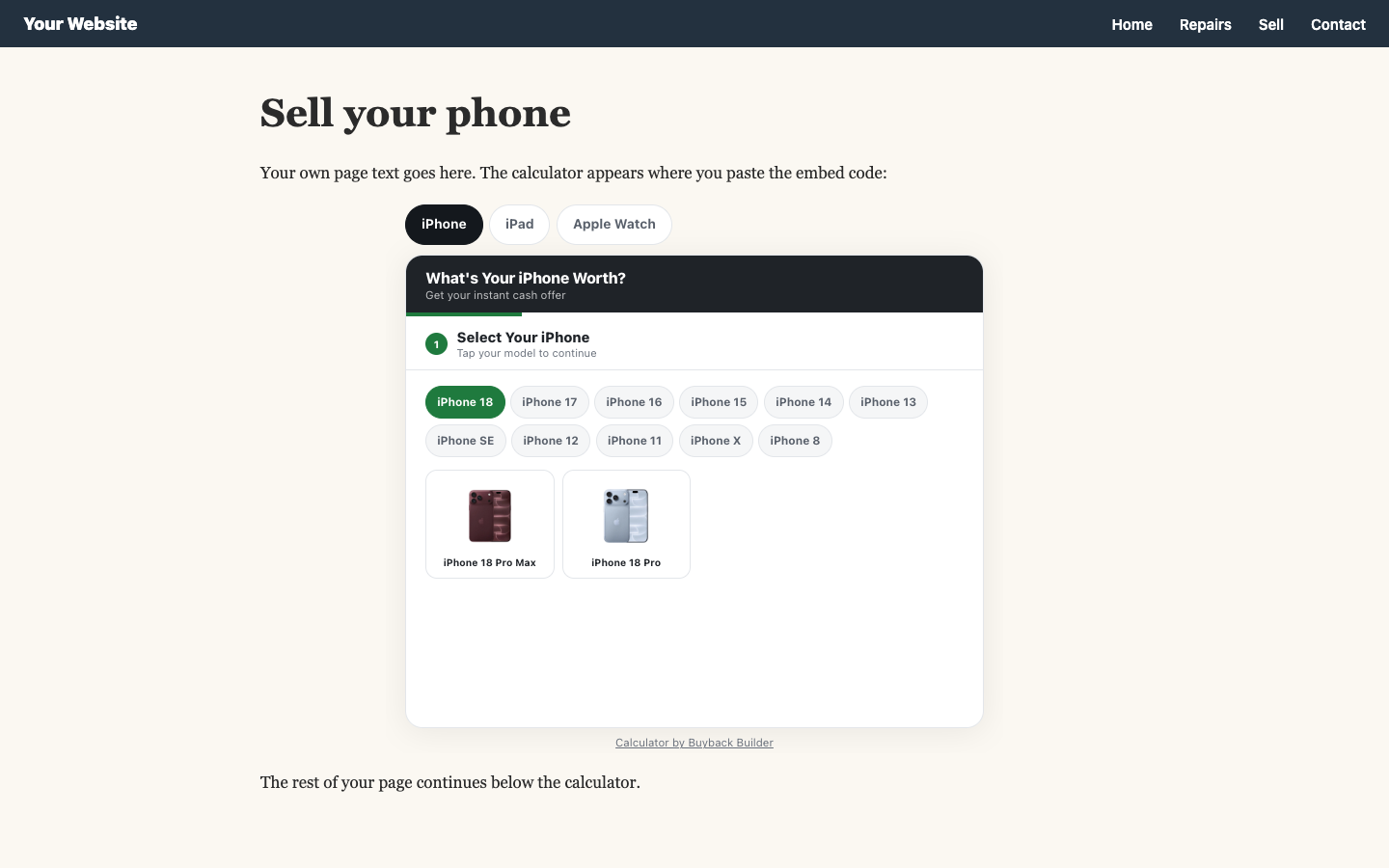
To add a phone buyback widget to a Wix site, copy your embed code, then in the Wix Editor click Add Elements, choose Embed Code, then Embed HTML, paste the code with Enter Code, and click Apply. Then drag the element tall enough to fit the widget, because Wix shows embedded code in a box with a fixed height.
The steps below use Buyback Builder's embed code, but the Wix part is the same for any script based widget.
Before you start
You need two things:
- Your embed code. In the Buyback Builder dashboard, open Embed and copy the code. It is one line that looks like this, with your own page name in
data-shop:
<script src="https://buybackpage.com/embed.js" data-shop="yourshop"></script>- A page on your Wix site for it. Most shops use a page called Sell or Sell Your Phone, linked from the main menu. A dedicated page also gives you a clean link to share.
Your buyback page needs at least one model turned on with market prices before it shows anything useful, so set your prices first. The buyback website guide covers that part.
Add the widget in the Wix Editor
These steps follow Wix's help article on embedding a site or a widget:
- Open the page in the Wix Editor.
- Click Add Elements on the left.
- Click Embed Code, then Embed HTML. An empty HTML box appears on the page.
- Click the box, then Enter Code.
- Choose the code option, paste your embed code, and click Apply.
- Drag the bottom edge of the box down so it is about 1100 pixels tall, and stretch it to the width of your content area.
- Preview the page, then Publish.
Add the widget in Wix Studio
Wix Studio has the same element under a different menu:
- Click Add Elements, then Embed & Social.
- Choose Embed Code, click Enter Code, paste, and click Apply.
- Size the element as in step 6 above.
If you use the newer Wix Harmony editor, Wix places the embed under Add, then Elements, More Options and Embed, where you drag Embed code onto the page and paste the code in its settings.
Why the height setting matters
Wix runs code from the Embed HTML element inside its own iframe. Wix's help article says so directly, and it notes that the element is not responsive. The Buyback Builder widget resizes itself as customers move through the steps, but on Wix it can only grow inside the box Wix gives it. If the box is too short, the lower part of a step is cut off.
That is why you set the box tall. About 1100 pixels fits every step on desktop. Then check the mobile view in the Wix Editor: switch to mobile, select the element, and make it tall there too, since mobile layouts are often taller.
A simpler option: link to your page
If the embedded box feels cramped on your template, or you would rather not adjust heights, link to your hosted page instead. Add a button that says Get a cash offer and point it at https://yourshop.buybackpage.com. Customers get the full widget on its own page with your logo, address, phone and hours, and you skip the height question entirely. Many shops do both: the embed on the Sell page and the link on Google Business Profile and in text replies.
Troubleshooting
- Nothing shows in the editor. Some embedded code only runs on the published site or in Preview. Publish and check the live page.
- The bottom of the widget is cut off. Make the HTML box taller, on desktop and on mobile.
- Only one device should show. Copy the single device code from the Embed page in your dashboard. It adds
data-device="iphone"(or ipad, watch, samsung, pixel or macbook) and starts on that device's model step. - Wix shows an error about insecure content. Wix only displays HTTPS code. The Buyback Builder script is served over HTTPS, so check that the code was pasted exactly as copied.
Using a different builder? See the guides for WordPress and Squarespace, or go back to the home page.
Frequently asked questions
Does the Wix buyback widget need a premium Wix plan?
Wix's help article on the Embed HTML element does not state a plan requirement. Wix's site wide Custom Code setting is different: it requires a published site with a connected domain. The steps on this page use the Embed HTML element.
Why is the widget cut off on my Wix page?
Wix shows embedded code in a box with a fixed height. Drag the box taller, about 1100 pixels, and do the same in the mobile editor.
Do locked offers work inside the Wix embed?
Yes. The customer locks the price inside the widget, gets their offer email with the code, and the offer shows up in your dashboard marked as coming from your website.
Can I show only iPhones on my Wix site?
Yes. Use the single device embed code from your dashboard. It starts the widget on the iPhone model step.
Will the widget slow down my Wix page?
The embed is one small script. The widget itself runs in its own frame from a separate address, so its styles and code stay out of the rest of your page.