Trade-in software for phone repair shops: what you actually need
Trade-in software for a phone repair shop does three jobs: it shows customers what you will pay for their device, it holds that price until they come in, and it keeps a record of every offer so you know what turned into a sale. Most repair shops that buy over the counter need those three and little else, while mail in programs, multi store chains and refurbishers need a heavier platform with shipping, payouts and device testing.
This guide breaks the category down by what each feature does for a shop, so you can tell what you need now from what you might need later.
The three jobs every shop needs
1. An instant quote customers can get on their own
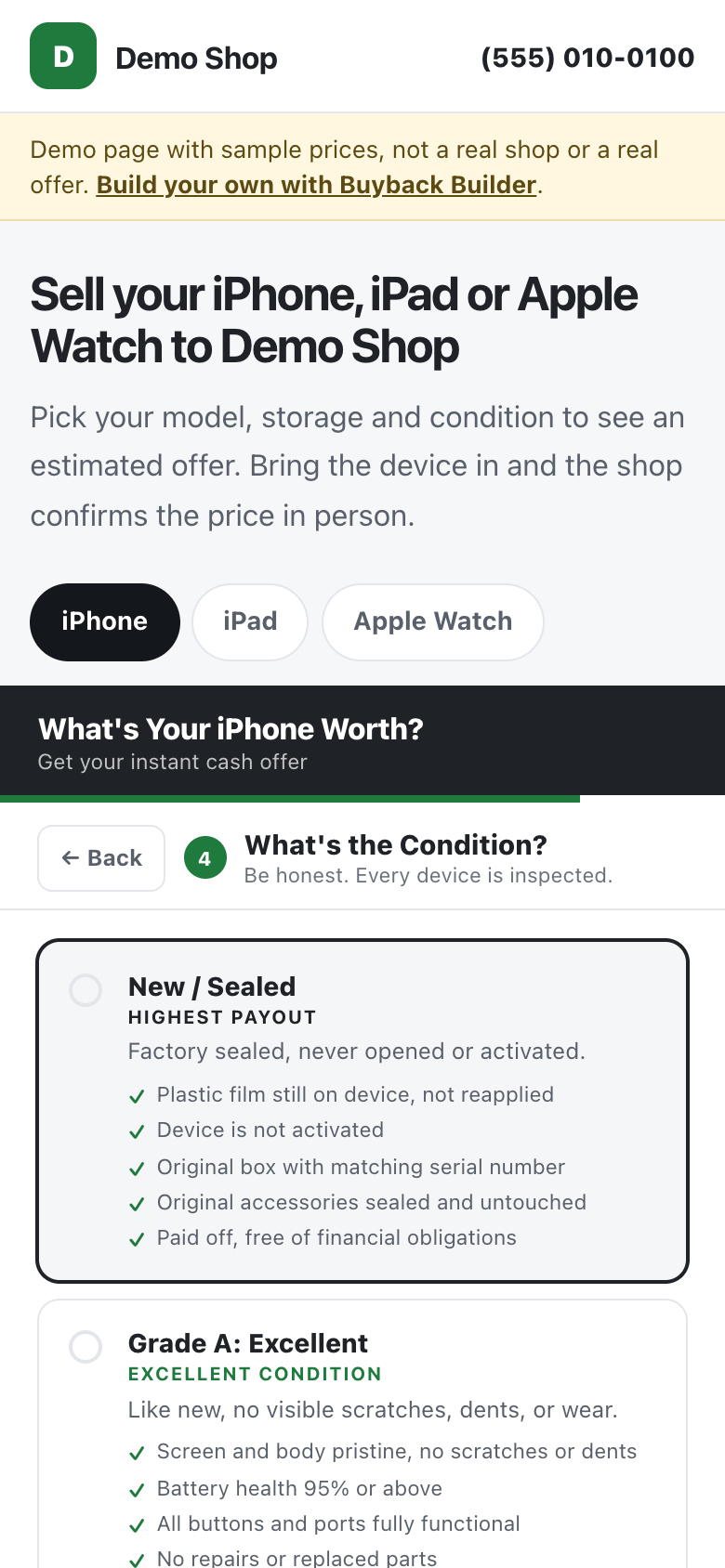
Customers compare offers before they leave the house. If your shop only quotes over the phone or at the counter, you lose the people who are shopping around. A quote tool lets them pick their model, storage, carrier and condition, and see a number in under a minute.
Look for a flow built for phones, real device photos so people can find their model, and grades with written requirements (battery health, cracked glass, replaced parts) so the grade the customer picks matches what you see at the counter.
2. A price lock that brings the customer in
A quote on a screen is easy to forget. A price lock turns it into a commitment: the customer enters their name and email and gets an offer code with an expiry date, your address and hours, and prep steps such as turning off Find My.
3. A record of offers
When a customer arrives with an offer code, you look it up, confirm the device and mark the outcome. Over a few weeks, that list shows how many quotes became sales.
Features that matter at higher volume
These features are real and useful, but each one solves a problem that a typical walk in shop does not have yet.
| Feature | What it solves |
|---|---|
| Mail-in with shipping labels | Buying from customers who cannot visit |
| Digital payouts | Paying sellers without cash at the counter |
| Device diagnostics and data erasure | Consistent grading and certified wiping at scale |
| IMEI and blacklist checks | Catching stolen or financed devices |
| Multiple locations | One price list across stores |
| Inventory and invoicing | Tracking devices after you buy them |
If one of those rows describes your shop today, look at a platform built around it. The options table below shows which tools cover what.
Pricing: the part that takes the most time
The software is the easy part. Keeping prices current is the work. One iPhone model can need dozens of prices once you multiply storage sizes, carriers and grades. Look for a tool that works out grade prices from market prices and percentages, lets you pin any single price, and imports and exports a spreadsheet.
Buyback Builder works this way, laid out like a pricing spreadsheet: Market New and Market A go in, a buy price for every grade comes out, rounded to 5, and any cell can carry an exact price instead. The trade-in pricing guide walks through the method with a worked iPhone example.
Where to put it
Your trade-in tool should live where customers already find you:
- Your website. Paste a trade-in widget on your Sell page. There are step by step guides for Wix, WordPress and Squarespace.
- A link of its own. Put it on your Google Business Profile, in text replies and on a sign at the counter.
Trade-in software options and prices
Here are ten tools with the price each one publishes on its own site, checked on October 19, 2026. Type tells you what you are buying: a widget that goes on your existing website, a standalone buyback website, a larger platform, or a point of sale (POS) system with trade-in built in.
| Product | Type | Published price |
|---|---|---|
| Buyback Builder | Widget and standalone buyback page | $29/month, 30 days free |
| STACKS | Widget (full buyback websites sold separately) | $49/month, first month $7; or $348/year |
| WerOrg | Standalone buyback website (mail-in storefront) | Starter $37, Growth $67, Pro $97/month |
| Reusely | Platform with an embeddable widget | Core $99, Scale $249, Enterprise $999/month |
| NSYS Buyback | Platform: in-store software, website widget and app | Not published; free demo on request |
| R3UP | Standalone buyback website built for your business | Device Buyback Pro $699 plus a setup fee; billing period not stated |
| RepairDesk | Repair shop POS with device buyback and trade | From $79 per store a month billed yearly, or 99 monthly |
| CellStore | POS for shops that repair, buy, sell and trade devices | $39 per store a month |
| Gadgets POS | POS with trade-in at the till | Not published; quoted per shop, 15-day trial |
| Bravo Store Systems | POS for pawn and resale stores with buy, sell and trade intake | From $99/month |
A few notes so the table is fair. STACKS, WER|ORG, R3UP and Reusely all handle shipping labels or mail-in in some form, which Buyback Builder does not. RepairDesk, CellStore, Gadgets POS and Bravo are full point of sale systems, so their price covers far more than trade-ins; compare them against the POS you already pay for, not against a widget. Bravo's site is written for pawn, firearm, jewelry and consignment stores and does not mention phones specifically.
Buyback Builder is the simplest option on this list, not the one with the most features. It covers the three core jobs for walk-in buyback and leaves out mail-in, payouts and diagnostics. Side by side comparisons: Reusely, STACKS, WER|ORG and NSYS Buyback.
How Buyback Builder fits
Buyback Builder covers the three core jobs for iPhone, iPad, Apple Watch, Samsung Galaxy, Google Pixel, MacBook, Meta Glasses and Nintendo Switch: an instant quote page, a price lock by email with offer codes, and an offers list with Paid, No Show and Declined. It does not do mail in, payouts or diagnostics today; mail in is planned. It costs $29/month after 30 free days. See the home page for how it works.
Frequently asked questions
What is the difference between trade-in software and buyback software?
Shops use the terms interchangeably. Trade-in sometimes means the customer gets credit toward a purchase, and buyback that they get cash, but the software does the same job: quote, lock and track.
Do I need trade-in software if I already have a POS?
A point of sale system records the sale once the customer is at your counter. Trade-in software works before that, when the customer is deciding whether to come in at all.
How much does trade-in software cost?
It ranges widely. Most published plans in the table fall between $29 and $99/month. Reusely's Enterprise plan lists $999/month, R3UP lists $699 without saying whether that is monthly, and NSYS and Gadgets POS quote per business. Compare what you would use, not the length of the feature list.
Can trade-in software check if a phone is stolen?
Some platforms include IMEI and blacklist checks. Buyback Builder does not, so run your usual check at the counter before you pay.